Skip to content
View in the app

A better way to browse. Learn more.

PalmTalk

A full-screen app on your home screen with push notifications, badges and more.

To install this app on iOS and iPadOS
  1. Tap the Share icon in Safari
  2. Scroll the menu and tap Add to Home Screen.
  3. Tap Add in the top-right corner.
To install this app on Android
  1. Tap the 3-dot menu (⋮) in the top-right corner of the browser.
  2. Tap Add to Home screen or Install app.
  3. Confirm by tapping Install.

Leaderboard

Popular Content

Showing content with the highest reputation on 04/28/2013 in all areas

  1. edric
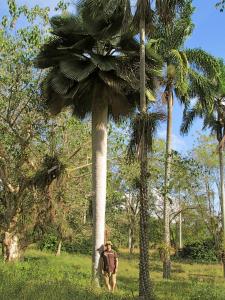
    Here's a photo featuring our host Jason Schoneman for scale, Cienfuegos Botanical Garden, Cuba, thanks again guys, Ed
  2. virtualpalm
    I'm gonna go with C. fallaensis just based on shear size. The others are hard to see on my phone but the tall "knobby" one with its head out of the picture could be C. alba (or C. prunifera), and the other skinny trunk things might be some type of Roystonea.

Account

Navigation

Configure browser push notifications

Chrome (Android)
  1. Tap the lock icon next to the address bar.
  2. Tap Permissions → Notifications.
  3. Adjust your preference.
Chrome (Desktop)
  1. Click the padlock icon in the address bar.
  2. Select Site settings.
  3. Find Notifications and adjust your preference.