Skip to content
View in the app

A better way to browse. Learn more.

PalmTalk

A full-screen app on your home screen with push notifications, badges and more.

To install this app on iOS and iPadOS
  1. Tap the Share icon in Safari
  2. Scroll the menu and tap Add to Home Screen.
  3. Tap Add in the top-right corner.
To install this app on Android
  1. Tap the 3-dot menu (⋮) in the top-right corner of the browser.
  2. Tap Add to Home screen or Install app.
  3. Confirm by tapping Install.

Leaderboard

Popular Content

Showing content with the highest reputation on 03/02/2012 in all areas

  1. BS Man about Palms
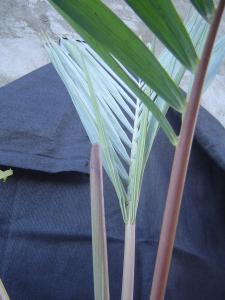
    Here is a picture of my "loved one" in better days... My beloved Kentiopsis piersoniorum. PS- I thought of making this a poll, but seeing it bumped without a post in 2 years might bring back bad mammries.
  2. yeye
    hi i search desperately seeds of this beautiful palm ! if somenone could help me!! thanks olivier
  3. damir
    can i be the second at the list of those who wants it?? i prefer alfredi

Account

Navigation

Configure browser push notifications

Chrome (Android)
  1. Tap the lock icon next to the address bar.
  2. Tap Permissions → Notifications.
  3. Adjust your preference.
Chrome (Desktop)
  1. Click the padlock icon in the address bar.
  2. Select Site settings.
  3. Find Notifications and adjust your preference.