Skip to content
View in the app

A better way to browse. Learn more.

PalmTalk

A full-screen app on your home screen with push notifications, badges and more.

To install this app on iOS and iPadOS
  1. Tap the Share icon in Safari
  2. Scroll the menu and tap Add to Home Screen.
  3. Tap Add in the top-right corner.
To install this app on Android
  1. Tap the 3-dot menu (⋮) in the top-right corner of the browser.
  2. Tap Add to Home screen or Install app.
  3. Confirm by tapping Install.

Leaderboard

Popular Content

Showing content with the highest reputation on 02/20/2012 in all areas

  1. Central Floridave
    1 point
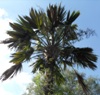
    Kind of makes you question why? Y shaped Sabal palm at old Cypress Gardens, which is now LegoLand Florida:
  2. gyuseppe
    very beautiful ! -------------------------- hello and please: you're Italian? regards
  3. PalmatierMeg
    Welcome. Your Cham tuerck is awesome. You are doing something very right.
  4. gyuseppe
    1 point
    yes in in my city There are many centenarians Cycas revoluta

Account

Navigation

Configure browser push notifications

Chrome (Android)
  1. Tap the lock icon next to the address bar.
  2. Tap Permissions → Notifications.
  3. Adjust your preference.
Chrome (Desktop)
  1. Click the padlock icon in the address bar.
  2. Select Site settings.
  3. Find Notifications and adjust your preference.