Skip to content
View in the app

A better way to browse. Learn more.

PalmTalk

A full-screen app on your home screen with push notifications, badges and more.

To install this app on iOS and iPadOS
  1. Tap the Share icon in Safari
  2. Scroll the menu and tap Add to Home Screen.
  3. Tap Add in the top-right corner.
To install this app on Android
  1. Tap the 3-dot menu (⋮) in the top-right corner of the browser.
  2. Tap Add to Home screen or Install app.
  3. Confirm by tapping Install.

Leaderboard

Popular Content

Showing content with the highest reputation on 05/10/2011 in all areas

  1. Pedro 65
    Hi its starting to cool down here in Subtropical oz, no good for planting palms but Broms,Get em into the Sun for Colour, Colour, Colour. I will try and caption all but might be a bit fuzzy as the Palms get 98.765 % of our time in Summer Autumn. Enjoy . Pete PS MORE TO FOLLOW
  2. newtothis
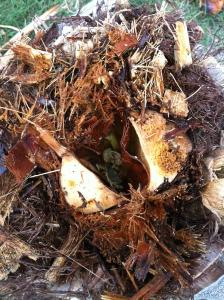
    Well this changes things. Time of death 5/9/11 5:30p. I guess its better since someone said it would take years to look normal again anyway. Thanks for all the help!
Account

Navigation

Configure browser push notifications

Chrome (Android)
  1. Tap the lock icon next to the address bar.
  2. Tap Permissions → Notifications.
  3. Adjust your preference.
Chrome (Desktop)
  1. Click the padlock icon in the address bar.
  2. Select Site settings.
  3. Find Notifications and adjust your preference.