Leaderboard
-

PalmGuyWC
IN MEMORIAM2Points4,327Posts -

ghar41
IPS MEMBER2Points2,039Posts -
nomolos
IPS MEMBER1Points1,078Posts -

Patrick
IPS MEMBER1Points1,772Posts
Popular Content
Showing content with the highest reputation on 02/20/2010 in Posts
-
1 point1 point
 1 pointThey are fast growers, can handle a lot of heat, and a lot of moisture. Matt1 point
 Eric, I can agree with Dick about getting Jubs up to any decent stage. I never had any problem germinating and getting the majority to 2-3 leaf stage. But there is a continual attrition of numbers and now that my 10 remaining 5-6 YOA jubs [ about 10%] have a base the size of a baseball, I dont want to lose any more Now they are at this stage and still slow, I will be increasing he feeding rate to try to get them to accelerate. After all that, I dont water them overhead at all. Only ever water the soil around them Chris1 point
 Bumped your own thread, with nothing. Did they give you the keys to the medicine cabinet again?1 point
 1 point
I have two thoughts, I think chickens would be a great idea; hens only, though. They are pretty darn quiet. My neighbors behind me have had hens for years 40 feet from my bedroom window and they are never a problem. You have that greenhouse in the back which could be easily converted..... Concord feed will have some chicks in stock pretty soon. The only problem would be whether or not your dogs would want to make a meal out of them!!!??? The other option would be to have that guy that borrows your truck for a week come & pull everything.......... I guess roundup gets absorbed directly through the foliage only, so maybe that's why spraying the base of a palm would cause no ill effects???1 point
1 pointWhy don't you guys put them in the ground and then they would really take off. Or are you like me, have run out of planting room? I planted two B. archeris last summer and they have almost doubled in size since planted. Butias really like their roots in the ground......as most palms do. Dick1 point
1 point
1 pointI have two thoughts, I think chickens would be a great idea; hens only, though. They are pretty darn quiet. My neighbors behind me have had hens for years 40 feet from my bedroom window and they are never a problem. You have that greenhouse in the back which could be easily converted..... Concord feed will have some chicks in stock pretty soon. The only problem would be whether or not your dogs would want to make a meal out of them!!!??? The other option would be to have that guy that borrows your truck for a week come & pull everything.......... I guess roundup gets absorbed directly through the foliage only, so maybe that's why spraying the base of a palm would cause no ill effects???1 point
1 pointWhy don't you guys put them in the ground and then they would really take off. Or are you like me, have run out of planting room? I planted two B. archeris last summer and they have almost doubled in size since planted. Butias really like their roots in the ground......as most palms do. Dick1 point 1 pointyes the eriospatha is spineless , not sure if it will remain that way, but it is for now - its about three years old now and in a 15 gallon - beautiful flush of color w/ new leaf formation, and then it fades away until the new growth brings new color, yours looks a little more upright as mine is a little closer to the ground but mine is on the pooldeck in direct sun all day and that may have something to do with it1 point
 1 pointI think it is too small to make conclusions about the spines, and the butia archerii I saw did have small spines. Butia purpurescens is spineless. However, considering its size after 10 years of growing and its appearance, I would not want to bet against it being an archerii, most Butia would be quite large by now.1 point
I seem to have the perfect climate for Jubaeas, but for the past few years I've been "playing" with a couple of plants that were seedlings when I got them. They have been difficult to grow up, and most of the new fronds were half brown and they looked very sick. I don't water the crowns in the summer, but they get regular winter rain. Now that they are larger they seem to have grown out of the funk, whatever it was. I've heard that Jubaeas are difficult to get up from the seedling stage. Mine are 5 gal sized now. Dick1 point
1 pointI think it is too small to make conclusions about the spines, and the butia archerii I saw did have small spines. Butia purpurescens is spineless. However, considering its size after 10 years of growing and its appearance, I would not want to bet against it being an archerii, most Butia would be quite large by now.1 point
I seem to have the perfect climate for Jubaeas, but for the past few years I've been "playing" with a couple of plants that were seedlings when I got them. They have been difficult to grow up, and most of the new fronds were half brown and they looked very sick. I don't water the crowns in the summer, but they get regular winter rain. Now that they are larger they seem to have grown out of the funk, whatever it was. I've heard that Jubaeas are difficult to get up from the seedling stage. Mine are 5 gal sized now. Dick1 point 1 pointPalms are in the grass family so I'd think twice before I used it around my palms. If you have two or more of the same palms you could test it out on one and see if it works. Of course there is a possibility you could lose it.1 point
 1 pointI just saw a product that was a herbicide for grasses only. It said it was safe to spray around your ornamentals and flowers, etc. I saw it at Walmart next to the roundup.1 point
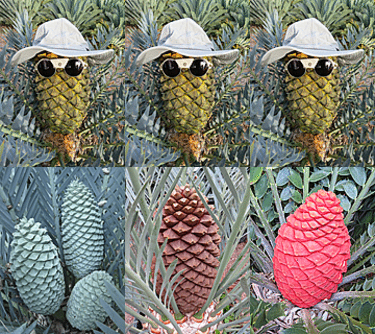 1 pointHi Matt, I have some E.horridus flushing right now but more E.lehmannii & E.princeps. The Blues don't seem to be bothered that much by our wintery weather. The large green species on the other hand always run the risk of damage to emerging flushes due to high swirling winds in combination with added weight due to rain. Happy growing, George Sparkman Cycads-n-Palms.com1 point
 1 pointWhich one? The "true" blue? the "not true" but blue one? or the big blue sorta blue one from Mardy? I forgot which one now. I'm so confused. Why not show us all of them-- hehe1 point
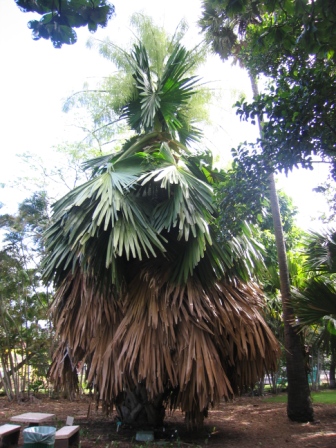
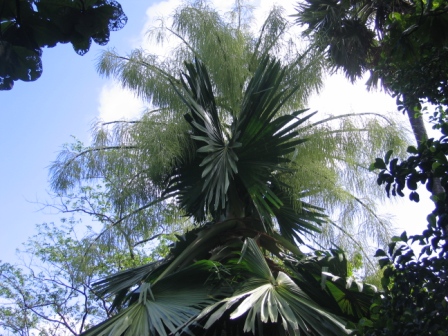
1 pointThanks FRITO and others, I'm sure you are correct. I always thought it was a giant Sabal. Thanks for the help There was another Corphya that was in bloom during my visit at FBG. It must be a different species as the leaves were quite different. Sorry for getting off topic!
1 pointWhich one? The "true" blue? the "not true" but blue one? or the big blue sorta blue one from Mardy? I forgot which one now. I'm so confused. Why not show us all of them-- hehe1 point
1 pointThanks FRITO and others, I'm sure you are correct. I always thought it was a giant Sabal. Thanks for the help There was another Corphya that was in bloom during my visit at FBG. It must be a different species as the leaves were quite different. Sorry for getting off topic!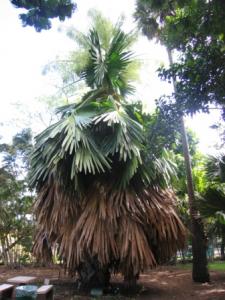
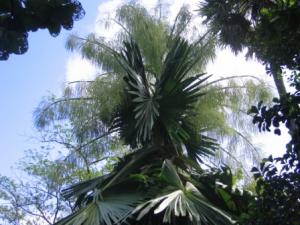 1 point
 1 pointI saw this Palm at Gary Woods Nursery (South Coast Palms). After they splashed water on me, when I regained consciousness and eventually speech, I asked Gary what it was and he said it is Sabal dominguensis. This other one is labeled Sabal causiarum in Santa Barbara. Here's a close up of the leaf- Jv- It's got seeds. I'll get you some if I can reach them next time I'm there. ---Perito1 point
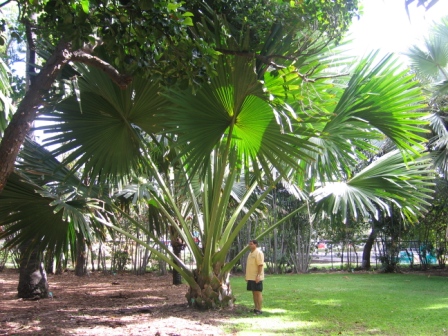
1 pointI took this pic a couple of years ago. This monster sits at Foster Botanical Garden on Oahu. For scale, there is a big guy in the picture. Wish I could remember the species.....maybe someone can help?
1 pointI saw this Palm at Gary Woods Nursery (South Coast Palms). After they splashed water on me, when I regained consciousness and eventually speech, I asked Gary what it was and he said it is Sabal dominguensis. This other one is labeled Sabal causiarum in Santa Barbara. Here's a close up of the leaf- Jv- It's got seeds. I'll get you some if I can reach them next time I'm there. ---Perito1 point
1 pointI took this pic a couple of years ago. This monster sits at Foster Botanical Garden on Oahu. For scale, there is a big guy in the picture. Wish I could remember the species.....maybe someone can help?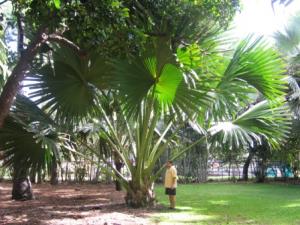 1 point